See llms.txt for all machine-readable content.

n8n vs. Copilot Studio: Which Is Right for You?

Comparing n8n versus Copilot Studio? Both can build AI agents and automate work. But once you start thinking about how those agents will actually run in production, the differences get harder to ignore.

Do you want the agent to live primarily inside Microsoft’s ecosystem or orchestrate work across a broader stack? How much control do you need over deployment, models, integrations, and custom logic?

Those trade-offs tell you which platform fits your team’s daily work.

LightningLightning vs symbol

Use n8n when

You need control over where your workflows run, you’re orchestrating AI across a mixed tech stack, or your workflows need custom logic alongside visual automation.

Use Copilot Studio when

Your team runs primarily on Microsoft, you want agents closely integrated with M365 and Power Platform, or you prefer Microsoft to own the underlying platform infrastructure.

Microsoft Copilot Studio vs. n8n: Tool overview

Deployment and scalability

n8n Cloud or self-hosted

Microsoft-hosted only

Security and governance

Project- and instance-level role-based access control (RBAC), with SSO and additional governance features on higher plans

Built around Microsoft and Power Platform governance, including data loss prevention (DLP) policies, data residency, and Microsoft compliance controls

Integration depth

Broad integration ecosystem, plus community nodes, client and server side MCP, and HTTP Request for services without a dedicated node

Power Platform connectors, HTTP, and MCP

AI workflow capabilities

AI agents that sit inside larger workflows, call tools, and work with different model providers

Low-code agent builder with instructions, knowledge, and tools

Developer tools

Visual building alongside JavaScript and Python in the Code node

Visual, low-code authoring with extension through Power Platform and external services

Pricing and licensing

Execution-based pricing, starting at $20/month billed annually for 2,500 executions; free self-hosted Community Edition

Usage-based Copilot Credits; Capacity packs start at $200/month for 25,000 credits, with pay-as-you-go and pre-purchase plans

What n8n and Microsoft Copilot Studio are built for

Union.svg

What’s n8n?

n8n is a source-available development and orchestration platform for building automated workflows and AI agents. It gives technical teams a visual canvas for connecting the systems their workflows depend on, while still giving users room to write custom code when needed.

That flexibility carries over to how n8n runs. Teams can use n8n Cloud or self-host on their own infrastructure. The idea is to handle the execution engine without boxing you into a fixed way of building or deploying.

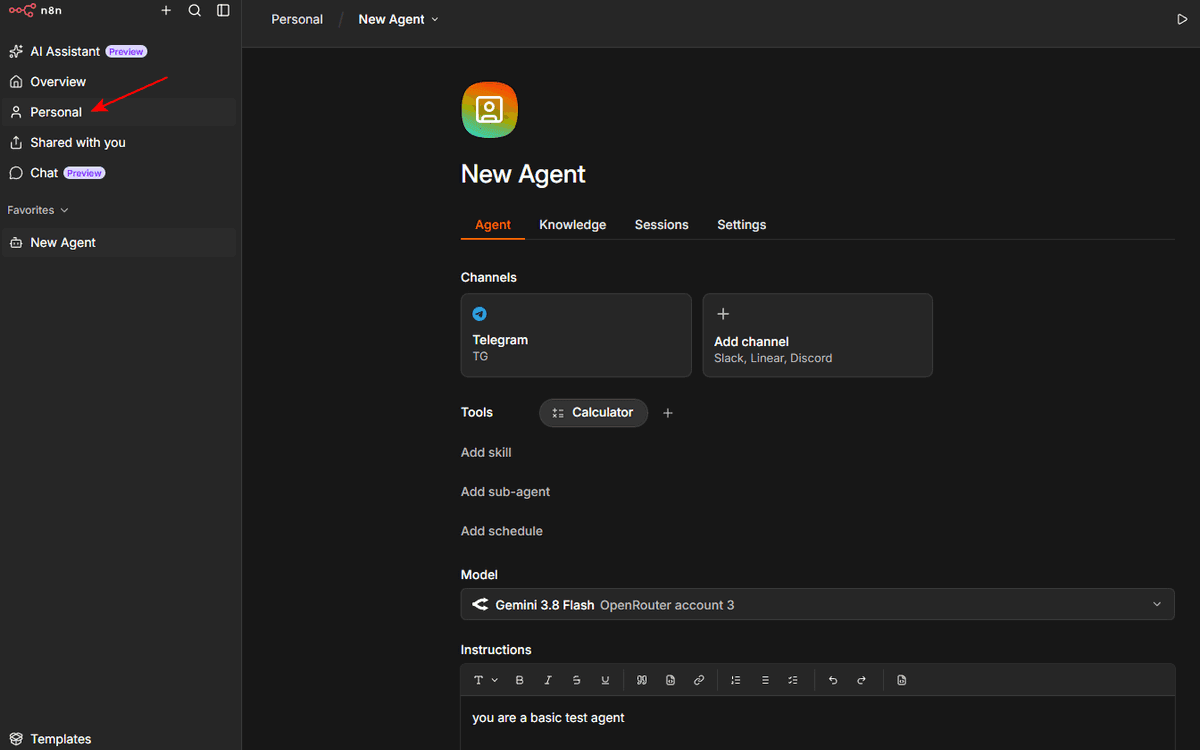
In addition to the workflow canvas, n8n offers a Chat Hub, where users can create personal agents completely through the UI, as well as an AI Assistant for creating and editing workflows.

n8n-01.png

What’s Copilot Studio?

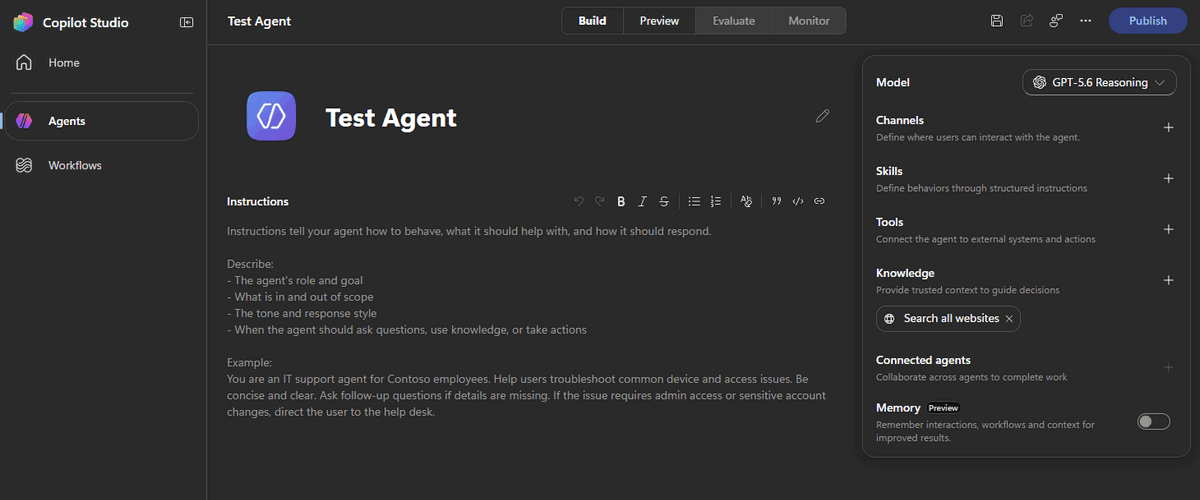
Microsoft Copilot Studio is a low-code AI agent platform built around Microsoft’s ecosystem. Teams use its visual authoring tools to create agents that can hold conversations and take action through connected services.

It fits most naturally into organizations already using Microsoft products. Copilot Studio works closely with Microsoft 365 and Power Platform, while connectors provide ways to reach other services. Instead of managing the infrastructure yourself, you build and publish agents within Microsoft’s hosted environment.

copilot-01.png

Deployment, production readiness, and scalability

n8n

n8n can run in n8n Cloud or on infrastructure your team controls. Self-hosting gives you more say over where the platform runs and how it fits into your existing environment, but it also means your team owns the deployment and its upkeep.

For higher workloads, n8n scales using queue mode. The main instance handles tasks like timers and webhook requests, then passes workflow executions to workers through a Redis-backed queue. You can add workers as demand grows instead of redesigning the workflows themselves.

Copilot Studio

Copilot Studio takes a managed approach. Agents run in Microsoft’s cloud rather than infrastructure you deploy yourself, so there’s no equivalent self-hosting path to manage.

Once an agent is ready, you publish it and make it available through supported channels like Microsoft Teams and Microsoft 365 Copilot. Microsoft handles the underlying platform infrastructure, which reduces your operational burden but also provides less control over where that infrastructure runs.

Security, governance, and access control

n8n

On paid plans, n8n uses granular RBAC to manage what people can do within the platform. Projects provide another layer of separation, letting you limit access to specific workflows and credentials instead of giving everyone the same level of control.

Permissions depend on the user’s role and plan. n8n documents the available roles for instance and project-level access. Business plans and higher add SSO, and the Enterprise tier includes audit logging for tighter governance.

Copilot Studio

Copilot Studio inherits much of its security model from Microsoft’s cloud and Power Platform. You can use DLP policies to control which connectors agents can use and how data moves between them.

Microsoft also handles data residency and compliance within its hosted environment. If your team already manages security through Microsoft, you can keep agent governance within that existing framework rather than introducing a separate one.

Integration depth

n8n

n8n gives you 1,000+ prebuilt and community integrations for connecting workflows to business apps, databases, developer tools, and AI services. Prebuilt nodes handle much of the setup you’d otherwise have to build yourself, like authentication and common API operations.

Community and partner-built nodes extend what you can connect to, and the HTTP Request node lets you work with services that don’t have a dedicated node. This allows your workflows to cross different vendors instead of staying inside one ecosystem.

For AI-powered workflows, n8n offers an MCP client node that connects to third-party MCP servers. The MCP Trigger node allows you to build your own MCP Servers and host them within n8n.

Copilot Studio

Copilot Studio uses Power Platform connectors to give agents access to other applications and services. If you already use Power Platform automation, that means your agents can work with many of the same connections you’ve already built into that environment.

You can extend agents beyond those connectors with HTTP requests and MCP. But Copilot Studio is simpler and faster to configure when the systems you need to connect are already part of Microsoft’s ecosystem.

AI workflow capabilities

n8n

n8n lets you build custom AI agents as part of a larger workflow. Connect a chat model and tools to the AI Agent node, and the agent decides which tools to call to complete actions. n8n’s visual canvas lets you see how the agent connects to the rest of your automation.

For more complex setups, you can use the AI Agent Tool node to let one agent call other agents as tools. This allows you to split work between specialized agents without moving outside the workflow.

You also have flexibility over the models you use. n8n supports multiple models, with providers including OpenAI, Anthropic, Google, Moonshot Kimi and others. n8n’s Ollama node lets self-hosted instances run local models, with no data leaving the infrastructure and no vendor API.

Users who are less tech-savvy can use personal agents. This n8n feature simplifies the process of creating agents, while the agents remain within your n8n instance, completely under your control.

Copilot Studio

Copilot Studio takes a more managed approach to building AI agents. You define an agent’s instructions and knowledge in its visual authoring environment, then give it tools to complete tasks. Copilot Studio also supports connected agents, allowing a primary agent to delegate tasks to other specialized agents.

Copilot Studio keeps more of the AI stack within Microsoft’s environment. While it provides built-in access to OpenAI and Anthropic LLMs, admins need to extend model access through Azure AI Foundry.

This platform doesn’t offer a way to manage local models. That point can carry weight when comparing AI agent builders. With Copilot Studio, all models are hosted in the cloud, so n8n may be a better choice if you work in a heavily regulated environment.

See n8n's AI agent architecture in action

Explore the template library

Developer tools and coding capabilities

n8n

n8n is visual, but you don’t have to stay inside the visual interface. When a workflow needs logic that’s not covered by a node, the Code node lets you add JavaScript or Python directly to the workflow.

That gives you room to handle edge cases without moving the whole automation into a separate codebase. You can use nodes for the straightforward parts, then add code wherever you need custom logic or complex data transformations.

Copilot Studio

Copilot Studio is geared more toward low-code development. You can build much of an agent through its visual tools and extend it when you need more specialized behavior.

You can extend agents with MCP tools from the low-code canvas, but pro-code development happens separately through Microsoft’s SDK. That’s different from n8n, where JavaScript or Python can sit directly inside the same visual workflow.

Debugging and error visibility

n8n

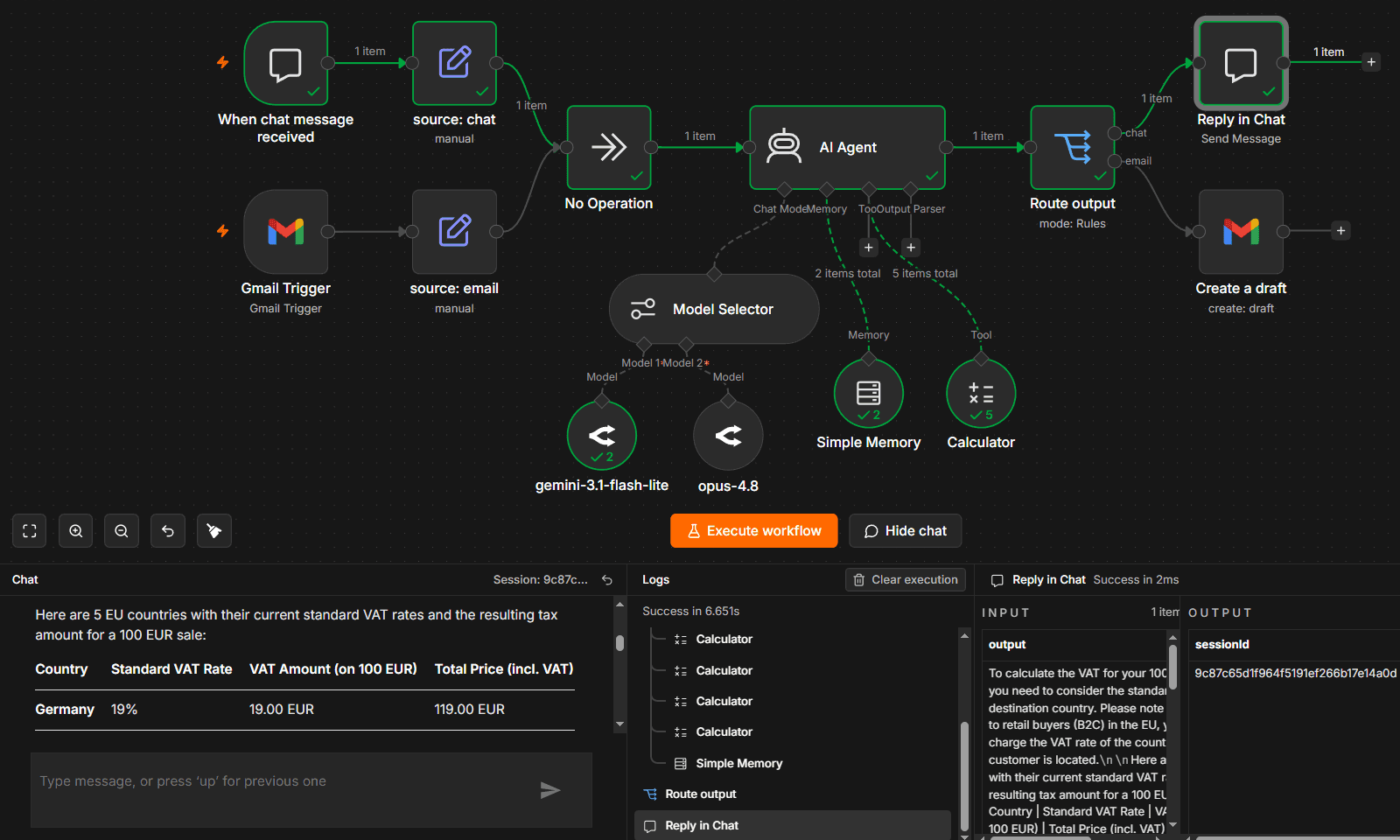
n8n lets you inspect workflow executions node by node to see where a run failed and what data reached that point. That gives you the context to troubleshoot the failure without piecing together logs from separate tools.

You can also build error handling into the workflow itself. The Error Trigger node can start a dedicated error workflow when an execution fails, while the Stop And Error node lets you deliberately stop a workflow when your own conditions are met.

n8n-02.png

Copilot Studio

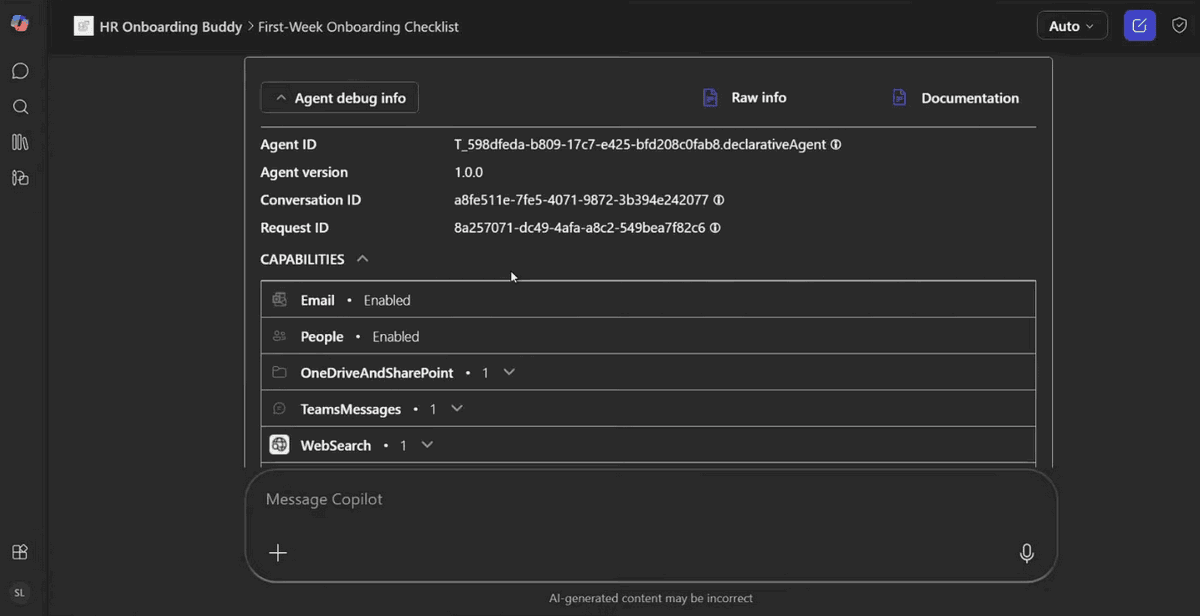
Copilot Studio gives you an activity map when you test an agent. It traces the agent’s decisions as the conversation runs, giving you a visual way to follow what happened and where things went wrong.

The activity map also flags problems like missing or invalid parameters. You can inspect the affected step in the test session and use that context to track down the issue.

copilot-02.png

Pricing and licensing

n8n

n8n prices its paid plans around monthly workflow executions. One execution is a complete workflow run, regardless of steps inside that execution. The plans differ in execution volume, hosting, and advanced features.

The n8n plans break down like this:

  • Starter: $20/month billed annually for 2,500 workflow executions per month. It’s hosted by n8n and includes five concurrent executions, one shared project, and unlimited users.
  • Pro: $50/month billed annually for 10,000 monthly executions. It raises concurrency to 20 and adds three shared projects, admin roles, workflow history, and execution search.
  • Business: $800/month billed annually. It’s self-hosted and adds six shared projects, SSO with SAML and LDAP, separate environments, scaling options, and Git version control.
  • Enterprise: Custom pricing and execution volume. You can run it hosted by n8n or self-hosted. It adds unlimited shared projects, 200+ concurrent executions, extended data retention, audit logging, log streaming, and dedicated support with an SLA.

There’s also a free, self-hosted Community Edition outside these paid plans.

Copilot Studio

Copilot Studio pricing is based on Copilot Credits, not workflow executions. Credits are consumed when an agent performs work, and the amount varies depending on the action or response. Microsoft gives you several ways to pay for that usage:

  • Copilot Credit capacity packs: $200 per pack per month for 25,000 Copilot Credits. Capacity is shared across the tenant, and unused credits don’t roll over.
  • Pay-as-you-go: There’s no upfront license commitment. You pay for the Copilot Credits you consume at the end of each monthly billing period (requires an active Azure subscription).
  • Pre-purchase plan: You buy Copilot Credit Commit Units upfront. Pay-as-you-go coverage is available if you run through your prepaid credits.
  • Microsoft 365 Copilot: $30 per user/month, paid yearly. Licensed users can build and use internal agents within Microsoft 365 at no additional cost. If you want autonomous agents or agents published to external channels like websites and apps, you’ll need standalone Copilot Studio.

See n8n's pricing

Execution-based, with a free self-hosted Community Edition.

How to choose the right approach

Choose n8n when

n8n is a great option if you want more control over the architecture behind your automations and AI agents. You can choose where n8n runs, work with different AI models, and connect workflows across a mixed technology stack.

It also makes sense when your workflows are likely to grow beyond straightforward low-code automation. You can keep most of the workflow visual, then add custom logic where you need it.

Choose Copilot Studio when

Copilot Studio is a strong n8n alternative when your team already works heavily within Microsoft’s ecosystem. It keeps agent building close to Microsoft 365, Power Platform, and the governance tools you may already use.

It’s also a good fit when you want Microsoft to manage the underlying platform. You give up the self-hosting and broader architectural control available with n8n, but you get an agent platform designed to work within your existing Microsoft environment.

The right fit depends on your stack

Both platforms can build AI agents that connect to other systems and take action. The biggest differences appear once you consider where those agents will live and how you’ll manage them over time.

If your team already relies on Microsoft 365 and Power Platform, Copilot Studio keeps agent development in a familiar environment. n8n gives you more room to build across a mixed stack, choose where your workflows run, and bring in custom code when you need it.

Your existing architecture makes the decision clear. If n8n fits yours, try n8n Cloud for free today.
Explore more n8n alternatives

n8n vs. CrewAI

Compare n8n versus CrewAI to determine the best architecture for your team. Learn how both handle multi-agent systems, integrations, and observability.

Read more

n8n vs. Node-RED

Find the best fit for your stack with this n8n vs Node-RED comparison. Review developer ergonomics, scaling, and AI nodes and integrations.

Read more

n8n vs. Make

If you’ve run into limits with Make’s operation-based pricing, data caps, or cloud-only setup, n8n might be a more flexible and cost-efficient alternative.

Read more

n8n vs. Zapier

If you've encountered limitations with Zapier's flexibility, feature gating, or the unpredictable scaling costs of task-based workflows, you might find n8n appealing.

Read more

Start building production workflows today.